.avif)
Notion vs Asana: Honest Comparison for 2026 (I tried both)

Choosing between Notion vs Asana can directly impact how your team actually works day to day. Pick the wrong tool and you end up fighting the system, duplicating work, and losing clarity. Pick the right one and collaboration feels natural, deadlines are clearer, and projects move forward with less friction.
I’ve spent weeks using both tools side by side to understand where each one excels and where it falls short. This comparison doesn’t try to crown a universal winner. The goal is to help you see which platform makes sense for your workflow, your team size, and how much structure you actually need.
.avif)
Table of content
What is Notion?
.avif)
Notion represents a different philosophy in the Asana vs Notion comparison. Instead of focusing only on project management, Notion is an all-in-one workspace that combines notes, databases, wikis, and task tracking in a single system.
Founded in 2013 by Ivan Zhao and Simon Last, Notion rebuilt the product from the ground up in 2015. Since then, it has grown into one of the most widely used productivity tools in the world.
Notion’s core strength comes from its block-based system. Every piece of content, whether text, tasks, tables, or embeds, is a movable block you can arrange however you want. This makes it possible to build everything from basic to-do lists to complex project databases, company wikis, and personal knowledge systems. The tradeoff is a learning curve, especially for new users.
Key Notion statistics for 2025:
- User base: 100 million users worldwide
- Paying customers: 4 million+
- Revenue: $400 million in 2024 (60% YoY growth)
- Valuation: $10 billion
- Fortune 500 adoption: Over 50% of Fortune 500 companies use Notion
- G2 Rating: 4.6 out of 5 stars (9450 verified reviews)
- Capterra Reviews: 2600+ verified reviews with 4.7 rating
When comparing Asana vs Notion, these numbers matter. They show strong adoption among teams that value flexibility over rigid workflows. Companies like OpenAI, Amazon, Nike, and Pixar use Notion to centralize knowledge and manage internal processes.
What is Asana?
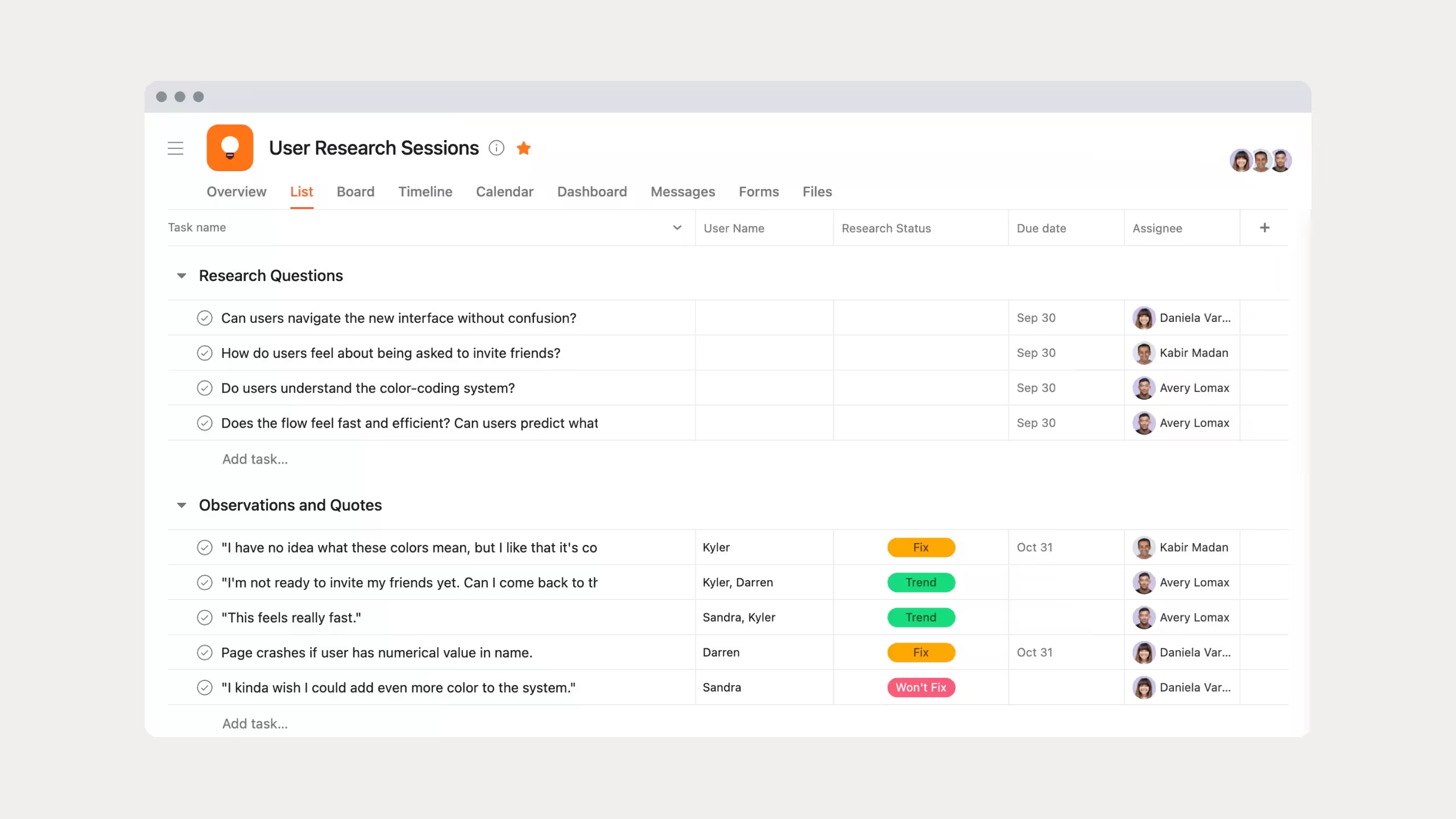
Asana is purpose-built project management software designed for teams that need structure and clarity.
Founded in 2011 by Facebook co-founder Dustin Moskovitz, Asana focuses entirely on planning, tracking, and executing work at scale. It operates in more than 200 countries and generated $652.5M in revenue in 2024, growing 19% year over year.
Asana’s Work Graph model connects tasks, projects, goals, and teams in a structured way. It supports multiple views including lists, Kanban boards, timelines, calendars, and Gantt-style charts, so teams can see work in the format that suits them best.
Key Asana statistics for 2025:
- Revenue: $652.5 million in 2024 (19% YoY growth)
- Customers paying $100,000+ annually: 607 accounts
- Employees: 1,840 team members globally
- G2 Rating: 4.4 out of 5 stars
- Capterra Reviews: 13,000+ verified reviews with 4.5 rating
In the Asana vs Notion comparison, these numbers reflect Asana’s deep enterprise adoption. Companies like Uber, Pinterest, and Airbnb rely on Asana to manage complex, cross-team workflows.
Notion vs Asana: Features Comparison
Project Management
Asana offers mature, structured project management out of the box. You can create projects quickly, assign tasks with dependencies, set milestones, and track progress using timelines and workload views. Delays automatically cascade, and managers can see capacity issues before they become problems.
Portfolios roll multiple projects into one view, while goals connect daily work to company priorities. Everything is opinionated and designed to work with minimal setup.
Notion takes a modular approach. You build your own project system using databases that can switch between tables, boards, timelines, calendars, or galleries. This allows full customization, but it also means more setup.
Notion lacks native dependency-based Gantt charts, automated rescheduling, and built-in resource management. Progress tracking often requires formulas and manual configuration.
If you manage tightly structured projects, Asana is stronger. If you want control over how projects are designed, Notion wins.
Task Management
Asana treats tasks as the core unit of work. Tasks support subtasks, priorities, assignees, due dates, recurring schedules, comments, and custom fields. Everything works immediately with no configuration.
Notion handles tasks inside databases you design yourself. You choose what properties to track and how tasks relate to projects, notes, or goals. This is powerful, but setup takes time.
In the Notion vs Asana debate, this comes down to structure versus flexibility.
Collaboration
Asana focuses on asynchronous collaboration. Conversations live directly on tasks and projects. Updates stay tied to work instead of spreading across email or chat tools.
Notion shines in real-time collaboration. Multiple users can edit the same page simultaneously, see live cursors, and co-create documents like in Google Docs. This works especially well for documentation, content creation, and shared knowledge bases.
Many teams end up using both tools for these reasons.
Automation and AI
Asana’s Rules feature automates routine actions using simple triggers and conditions. Its AI, Asana Intelligence, summarizes projects, answers questions, and helps build workflows.
Notion supports database automations with multi-step triggers and schedules. Notion AI focuses on writing, summarizing, searching across workspaces, and turning meetings into structured notes or tasks.
Asana’s AI is more operational. Notion’s AI is more content-focused.
Templates and Setup
Asana provides curated templates by industry and function, which makes onboarding fast and predictable.
Notion offers over 20,000 templates covering almost any use case imaginable. The downside is discovery. You may spend time searching and adjusting before landing on the right one.
The Asana vs Notion setup decision depends on whether you want speed or optionality.
Integrations
Both platforms integrate extensively with other tools, which matters for teams with established tech stacks. Asana connects natively with over 300 apps including Slack, Microsoft Teams, Google Workspace, Zoom, Salesforce, and Adobe Creative Cloud. Through Zapier, users access 7,000+ additional integrations.
Notion similarly integrates with 100+ apps directly and 7,000+ via Zapier. Recent acquisitions like Cron (now Notion Calendar) and new features like Notion Mail show the platform expanding to replace more of users' tool stack. For the Asana vs Notion integration question, both platforms connect well with popular business tools.
Real User Experiences
Asana is intuitive and opinionated. Most users are productive quickly.
Notion starts as a blank canvas. It feels harder at first but becomes powerful once you understand databases and blocks.
Asana wins short-term ease. Notion wins long-term adaptability.
Pricing: Notion vs Asana Cost Comparison
Understanding the true cost matters in any Asana vs Notion decision. Both platforms offer free tiers, but their paid plans differ significantly.
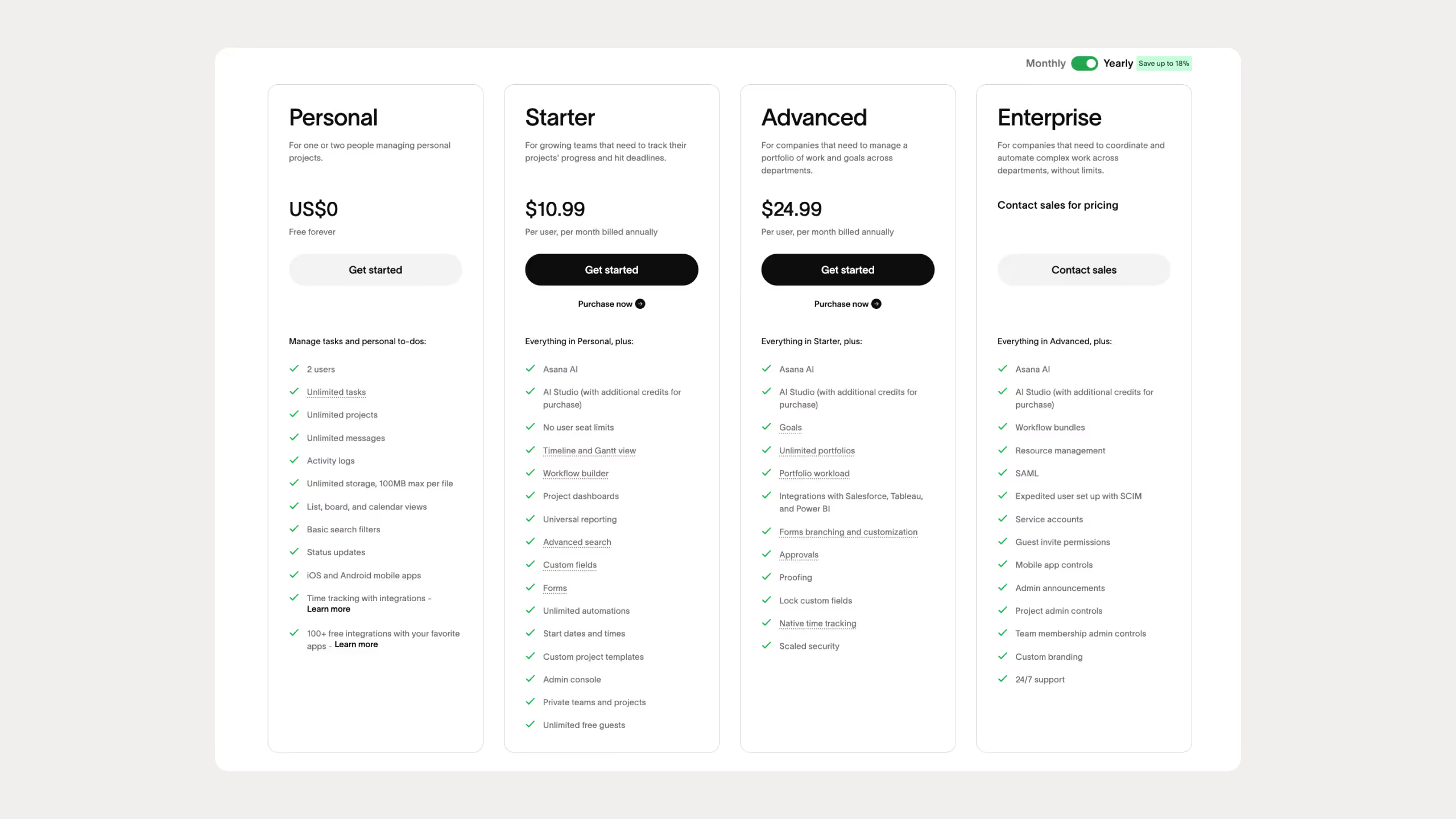
Asana Pricing
- Free plan: Up to 15 users, basic views and features
- Starter: $10.99 per user/month (annual), 2-seat minimum
- Real minimum cost: $21.98/month
- Advanced: $24.99 per user/month, 2-seat minimum
- Real minimum cost: $49.98/month
- Enterprise: Custom pricing
The mandatory minimum seat requirement is one of Asana’s biggest pricing criticisms.
Notion Pricing
- Free: Unlimited personal use, 10 guests
- Plus: $10 per user/month (annual)
- Business: $20 per user/month (annual)
- Enterprise: Custom pricing
.avif)
For individuals and small teams, Notion is significantly cheaper. At larger team sizes, pricing becomes closer, but Notion generally offers broader functionality per dollar.
Notion vs Asana: Side-by-Side Comparison Table
Here's a comprehensive comparison table showing how Notion vs Asana stack up across key features:
Best Use Cases: When to Choose Asana vs Notion
Understanding which tool fits which scenario makes the Asana vs Notion choice clearer.
Choose Asana if you:
- Manage structured projects with dependencies
- Need timelines and workload planning
- Want minimal setup
- Work in traditional PM environments
- Need portfolio-level visibility
Asana excels for project management teams, product development, marketing campaigns, and any workflow where tasks, dependencies, and deadlines need clear tracking. The platform works best for teams that value structure and don't need extensive customization.
Choose Notion if you:
- Want one workspace for docs, tasks, and knowledge
- Need custom workflows
- Manage information alongside projects
- Collaborate heavily on content
- Prefer flexibility over rigid systems
Notion shines for content teams, designers, researchers, startups, and anyone managing information alongside tasks. The platform works best for teams comfortable with initial setup time in exchange for long-term flexibility.
The Hybrid Approach
Many teams use both. Asana handles execution. Notion handles documentation, planning, and knowledge. Tools like Zapier or Make can sync tasks between them.
Notion vs Asana: Final Verdict
Choose Asana if you need structured project management that works immediately.
Choose Notion if you want one flexible system that adapts to how you think and work.
Use both if your team needs strong execution and strong documentation.
There is no universal winner in the Asana vs Notion debate. They reflect different beliefs about productivity. Asana favors structure. Notion favors adaptability.
Both work. Just for different people.
Common Questions About Notion vs Asana
Which tool is easier to use for beginners?
Asana is easier on day one. You create a project, add tasks, assign owners, and you’re done. Notion requires learning how pages, databases, properties, and relations work before it feels productive.
Why do some teams prefer Notion over Asana?
Teams choose Notion when they want one workspace for everything: docs, wikis, roadmaps, and tasks. Notion shines when work is fluid, creative, or knowledge-heavy. It feels less rigid and more customizable than Asana.
Is Asana worth the price compared to Notion?
It depends on team size and complexity. Asana becomes expensive quickly because of the two-seat minimum and higher tiers for advanced features. For solo users or small teams, Notion usually delivers more value for the cost.
Which is better for solo users?
Notion, almost always. It’s cheaper, more flexible, and better suited for individuals juggling notes, goals, and tasks in one place.