.avif)
Coda vs Notion: Honest Comparison for 2026 (I tried Both)

The comparison between Coda vs Notion is less about which tool is “better” and more about how you actually work. Both are powerful platforms, but they solve problems in different ways. This comparison breaks down where each one shines, where it falls short, and how I’d think about the choice if I were deciding today.
.avif)
Table of content
Notion: The All-in-One Workspace
When I compare Notion vs Coda, I always start with what makes Notion unique. With over 100 million users worldwide, Notion is one of the most widely adopted productivity tools I’ve used.
About Notion
Notion is an all-in-one workspace that brings notes, tasks, wikis, and databases together in one place. Founded in 2013 and launched in 2016, it grew from a simple note-taking app into a full productivity suite. I like its block-based system because everything from text to tables can be arranged freely inside pages.
.avif)
Notion Statistics
Looking at the numbers, Notion generated $400M in annual revenue in 2024, up from $250M in 2023, a 60% increase. It’s valued at $10B, and more than half of Fortune 500 companies now use it internally.
Key Strengths of Notion
From a product standpoint, Notion stands out in a few areas:
- Flexible pages: Create nested pages and build systems, not just notes.
- Databases and views: See the same data as tables, boards, calendars, lists, galleries, or timelines.
- Relations, rollups, and formulas: Link databases and calculate across them easily.
- Templates and community: 20,000+ templates and a big community for inspiration.
- Web clipper: Save articles and references directly into Notion.
- Notion AI: Assists with writing and summarizing (paid add-on).
Notion Pricing
This is Notion’s current pricing:
- Free: $0 with unlimited pages and blocks for individuals
- Plus: $10/user/month (annual) or $12/month
- Business: $20/user/month (annual) or $24/month
- Enterprise: Custom pricing
One important note: Notion AI is expensive and doesn't come default in any of Notion's pricing options, requiring an extra $10/user/month.
.avif)
Best Use Cases for Notion
- Documentation and team wikis: When information needs to be clear, readable, and easy to maintain.
- Small to mid-size CRMs and trackers: Sales pipelines, recruiting, content ops, and client tracking.
- Planning systems and internal tools: OKRs, onboarding, approvals, and team dashboards.
- Content workflows: Editorial calendars, writing systems, and publishing pipelines.
- Personal knowledge management: Notes, ideas, tasks, and references in one connected place.
- Teams with mixed technical skill levels: When everyone needs to use the system without training.
Coda: Documents That Behave Like Apps
On the other side of the Notion vs Coda discussion is Coda, which takes a more technical and system-driven approach to documents.
About Coda
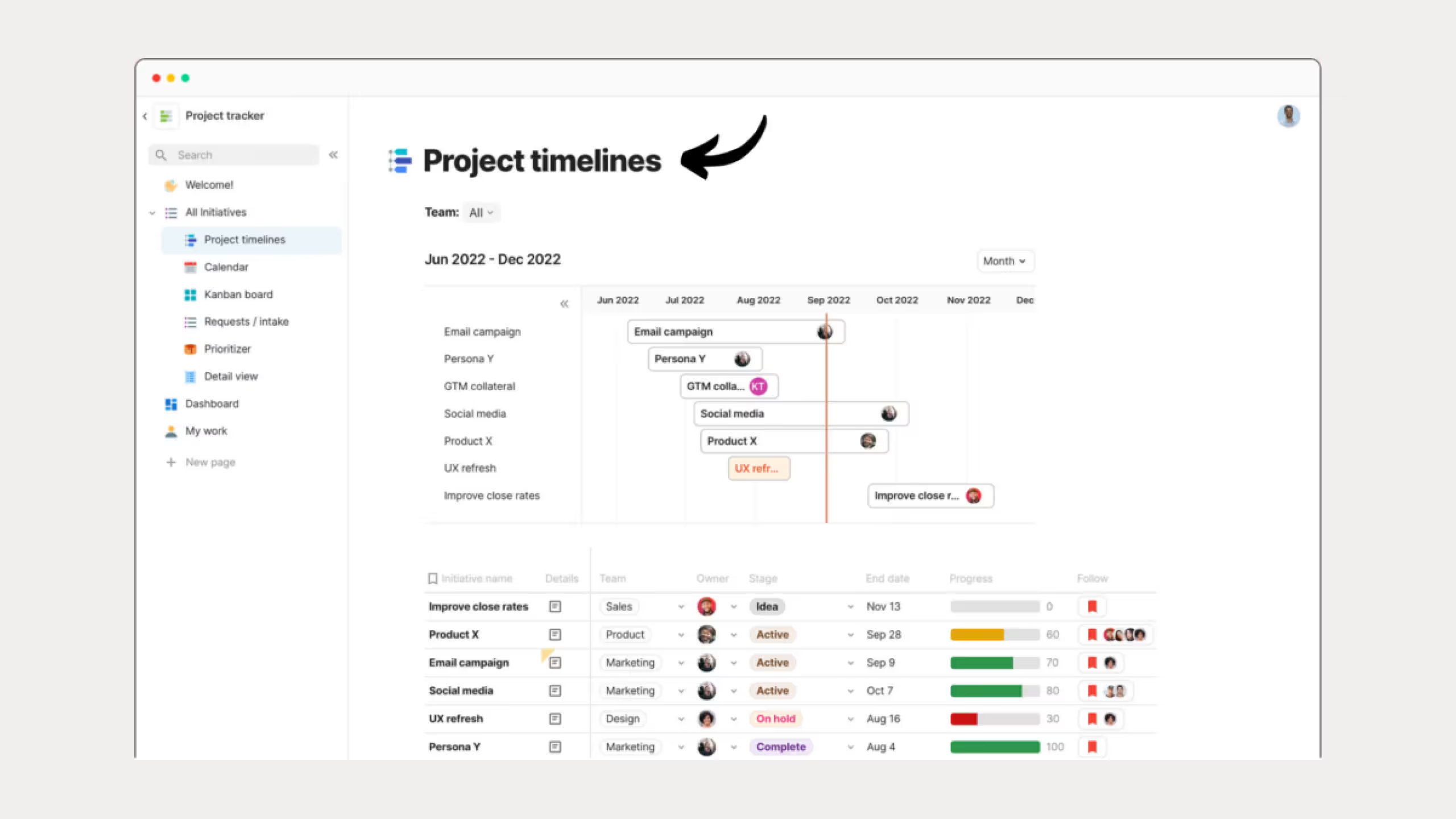
Coda was founded in 2014 by Shishir Mehrotra, former VP of Product at YouTube. I think of Coda as a platform where every document can act like its own mini-app, rather than just a place to write.
Coda Statistics
Coda reported $41.1M in revenue in October 2024 and has raised $240M, with a valuation of $1.4B. While it’s smaller than Notion, I see it attracting teams that care more about automation than aesthetics.
Key Strengths of Coda
Coda’s strengths are more technical:
- Advanced tables: Tables behave like databases mixed with spreadsheets, supporting complex formulas and logic.
- Buttons and automations: Users can trigger workflows directly from buttons inside docs without coding.
- Packs (integrations): Coda connects deeply with tools like Slack, Jira, and Google Calendar with real two-way sync.
- Formula language: The formula system is closer to Excel in power while remaining readable.
- Coda AI: Focuses more on data analysis and automation and is included for Doc Makers.
Coda Pricing
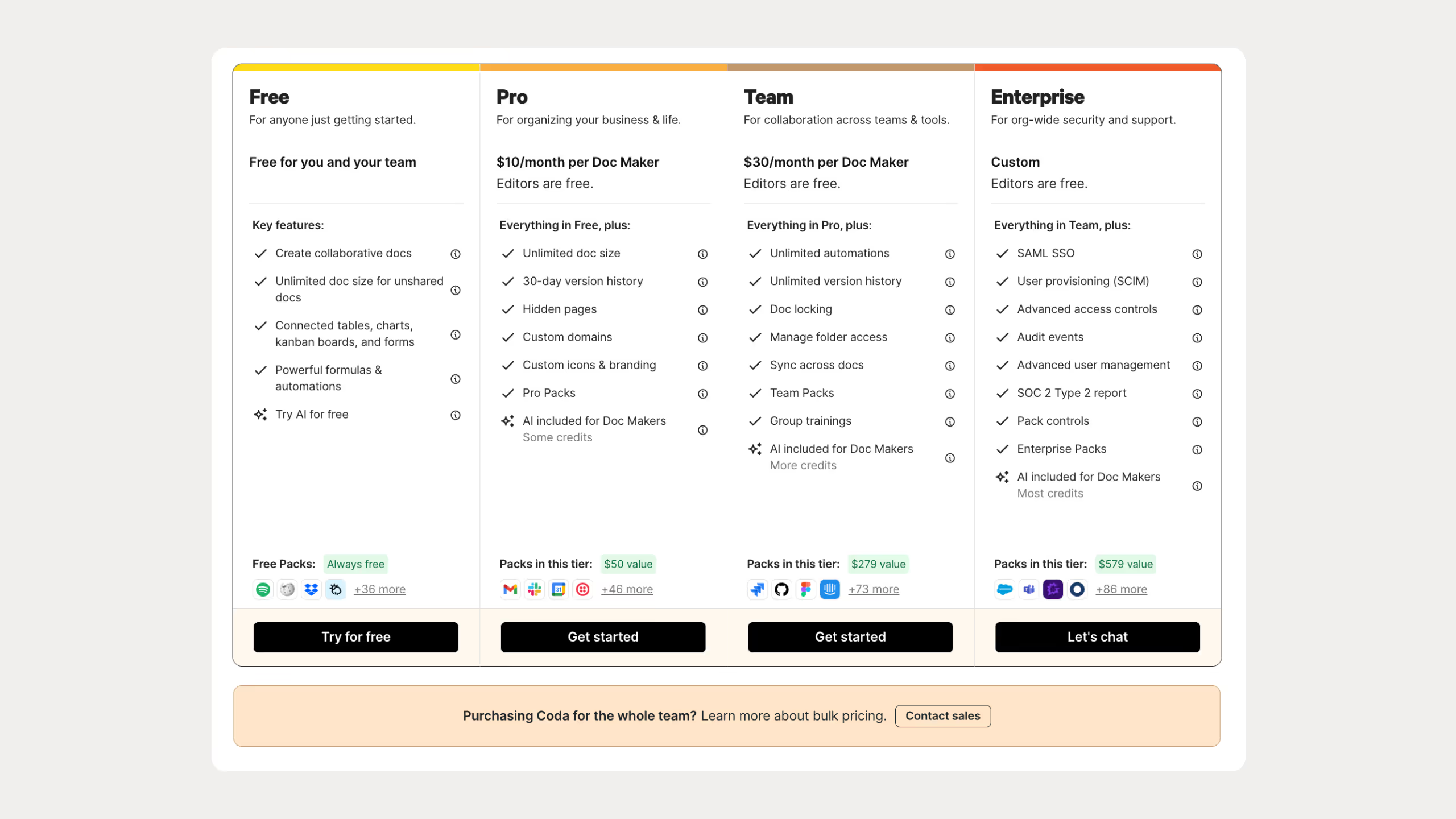
Coda’s pricing is based on creators rather than total users:
- Free: $0 with unlimited Doc Makers
- Pro: $10/Doc Maker/month (annual) or $12/month
- Team: $30/Doc Maker/month (annual) or $36/month
- Enterprise: Custom pricing
You only pay for Doc Makers in Coda. Everyone else can view or edit for free, which makes a big difference for larger teams.
Best Use Cases for Coda
- Large data systems: CRMs, inventories, or bug trackers with thousands of entries.
- Automated workflows: Processes driven by buttons, rules, and triggers.
- App-style internal tools: Approval flows, spend tracking, and operational tools.
- Complex calculations: Advanced formulas across multiple tables.
- Teams with few builders and many viewers: When only some users create systems and others consume them.
Notion vs Coda: Head-to-Head
Organization and Structure
Notion uses a wiki-style model where everything lives inside one large workspace of pages. This is intuitive at first, but navigation relies heavily on search and manual structure.
Coda organizes content into separate docs. Each doc feels self-contained, which tends to scale more cleanly as systems grow.
Performance and Scalability
For very large datasets, Coda generally performs better. Notion databases slow down as rows increase, while Coda is built to handle large, spreadsheet-style tables.
If performance with thousands of rows matters, this is one of the clearest differentiators.
Ease of Use
Notion has a gentler learning curve. Most people can be productive within minutes.
Coda requires more time to learn, especially if formulas and automations are involved. The tradeoff is more power once you commit.
Integrations
Notion relies heavily on third-party tools like Zapier for advanced automation.
Coda’s Packs provide native, two-way integrations that allow data to move in and out of docs programmatically.
AI Features
Notion AI focuses on writing, summarizing, and brainstorming, but adds a noticeable cost per user.
Coda AI focuses more on data transformation and automation and is included for creators.
Community and Support
Notion’s mobile app is more polished and consistent with desktop usage.
Coda’s mobile app works well for viewing and light edits, but complex docs are better handled on desktop.
Mobile Experience
I prefer Notion on mobile. It feels polished and consistent with the desktop app.
Coda works fine for viewing and quick edits, but I still do heavy work on desktop.
Comparison Table: Coda vs Notion
After looking at Notion vs Coda from every angle, this is how I’d personally choose between them.
I’d choose Notion if I:
- Want fast adoption by non-technical teammates
- Rely heavily on templates and community setups
- Focus on documentation, notes, and light project tracking
- Value a clean interface over deep automation
I’d choose Coda if I:
- Work with large, structured datasets
- Need automation without writing code
- Depend on deep integrations with other tools
- Prefer building internal tools rather than using templates
Cost Considerations: Coda vs Notion
Notion is usually more affordable for individuals and small teams.
Coda can be significantly cheaper for medium to large teams due to creator-based billing. Coda reports that many teams save up to 78% compared to per-user pricing models when only a fraction of users create docs.
The Bottom Line on Notion vs Coda
I don’t see this as a battle where one tool clearly wins. Notion is better for clarity, collaboration, and rapid adoption. Coda is better for automation, structure, and system-building.
If simplicity and speed matter most, Notion is the safer choice.
If control, logic, and automation matter more, Coda earns its learning curve.
Both offer strong free plans, and the smartest move is still the same: build a real workflow in each and see which one fits how you actually work.
Common Questions About Coda vs Notion
Which tool is easier for beginners to use?
Most users find Notion easier to learn and quicker to start with because of its block‑based editor and simpler interface, whereas Coda has a steeper learning curve due to its advanced logic features.
How do Notion and Coda compare on mobile and offline use?
Notion’s mobile app is widely seen as more polished and reliable, while Coda works on mobile but feels less refined, especially for complex docs. Both have limited offline editing.
Can Notion and Coda both be used for collaboration?
Yes. Both support real‑time editing, comments, mentions, and shared workspaces, but Notion’s collaboration is often considered more intuitive for non‑technical users.
Can I use both tools for personal productivity?
Absolutely. Notion is particularly strong for personal note-taking, task tracking, and building a “second brain.” Coda can also be used personally if you want advanced databases or mini-apps, but it’s often overkill for simple personal workflows.