.avif)
11 Notion E-commerce Templates to Grow Your Store in 2026

Notion e-commerce templates help online sellers manage orders, inventory, customers, and marketing from a single workspace. Instead of switching between spreadsheets, apps, and tools, the right Notion e-commerce store template centralizes daily operations into one clear dashboard.
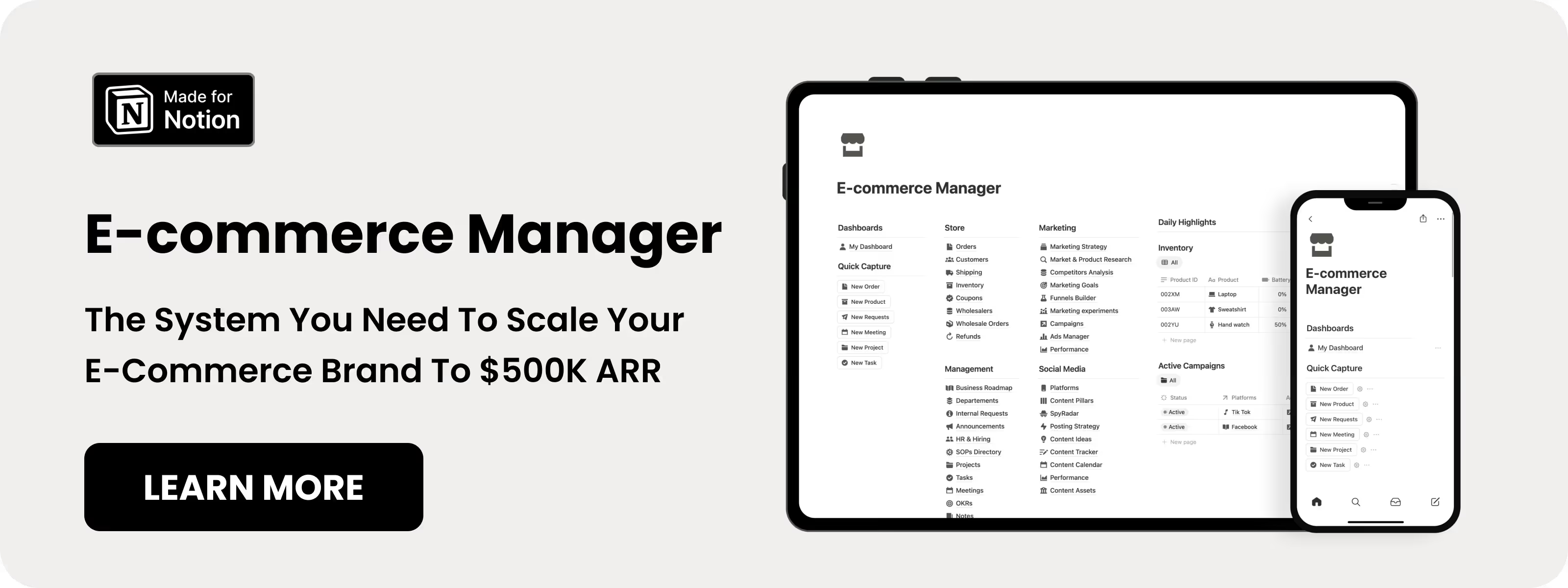
Table of content
11 Best Notion E-commerce templates
Running an online store means managing products, orders, customers, and marketing at the same time. These Notion e-commerce templates help you keep everything in one place so nothing slips through the cracks. Each template was selected based on real features and user feedback.
1. Notion E-Commerce Manager (⭐️ Recommended)
This Notion e-commerce template is built for serious store owners who want to grow without messy spreadsheets or scattered tools. It gives you one clear system to manage products, orders, and marketing.
Key features:
- Product research and competitor tracking
- Inventory and order tracking from start to delivery
- Marketing campaign planning and tracking
- Works with Shopify, WooCommerce, and Square via Zapier
Get E-commerce Manager template
.avif)
2. Notion Commerce Business OS
This Notion e-commerce template helps you manage inventory, money, and orders in one connected workspace. It is best for stores with many moving parts that need structure.
Key features:
- Stock tracking with low-inventory alerts
- Order creation and live order status
- Profit and sales dashboard
- Expense tracking tied to inventory
View Notion Commerce Business OS
.avif)
3. Notion E-commerce Business OS by Heyismail
This Notion e-commerce template is a full system that covers everything from inventory to customer feedback. It is ideal if you want one complete setup instead of multiple templates.
Key features:
- Inventory and supplier tracking
- Order and product management
- Customer notes and feedback tracking
- Shipping, returns, and delivery tracking
View Notion E-commerce Business OS
.avif)
4. Notion E-commerce Hub by EazyPath
This Notion e-commerce template focuses on clear order, shipment, and revenue tracking. It is great for store owners who want full visibility into daily operations.
Key features:
- Detailed order and customer tracking
- Shipment tracking with carrier and cost
- Live inventory tracking
- Revenue and order analytics dashboard
View Notion E-commerce Hub by EazyPath
.avif)
5. Notion E-commerce Kit
This Notion e-commerce template keeps things simple and focused for small store owners. It helps you understand customers and track store performance without clutter.
Key features:
- Customer database with order history
- Monthly sales and performance tracking
- Buyer persona creation
- Sales funnel and winning product tracking
.avif)
6. Notion Sales Tracker
This Notion e-commerce template is built to show you real profit, not just sales numbers. It works well if you mainly care about money and inventory accuracy.
Key features:
- Revenue and profit dashboard
- Inventory quantity and status tracking
- Automatic profit calculations
- Expense tracking by month and year
.avif)
7. Notion Shopify E-commerce Manager
This Notion e-commerce template is made specifically for Shopify store owners. It mirrors how Shopify sellers manage products, orders, and customers.
Key features:
- Shopify-style order tracking
- Simple invoice management
- Product catalog and stock tracking
- Customer purchase history
View Notion Shopify E-commerce Manager
.avif)
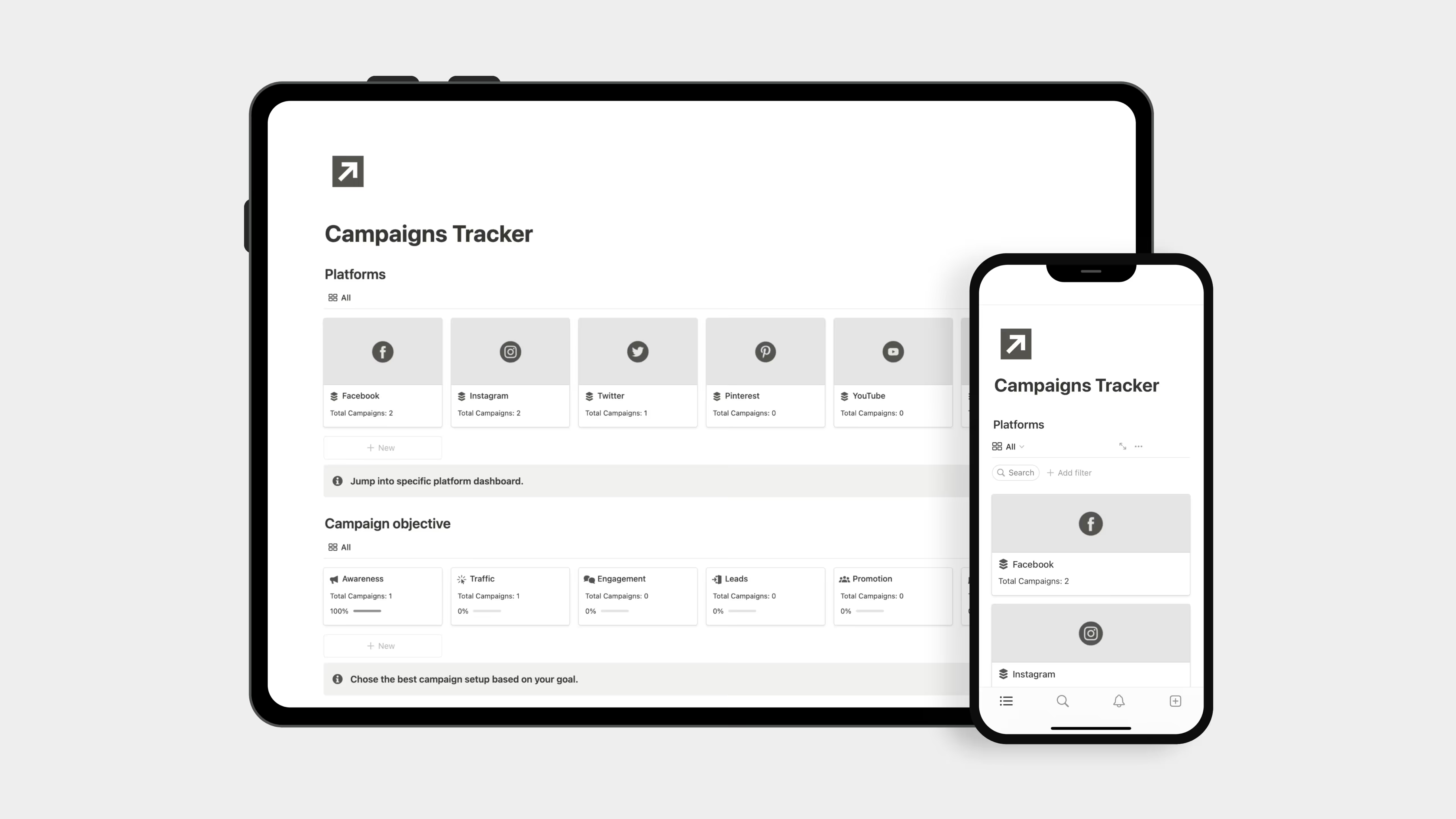
8. Notion Campaigns Tracker (Free)
This free Notion e-commerce template helps you track marketing campaigns in one place. It is useful if you run ads, emails, or promotions regularly.
Key features:
- Campaign planning and timelines
- Performance tracking by campaign
9. Notion Inventory Manager (Free)
This free Notion e-commerce template focuses only on inventory control. It is best if you already have other systems and just need better stock tracking.
Key features:
- Product list with quantities
- Stock level visibility
.avif)
10. Notion E-commerce Pack (Free)
This free Notion e-commerce template gives you the basics to start organized. It is ideal for new store owners who want structure without paying upfront.
Key features:
- Order tracking
- Customer database
- Inventory tracking in one system
.avif)
11. Notion Order Tracker (Free)
This free Notion e-commerce template focuses on tracking orders from purchase to delivery. It is best for sellers who want clean order and revenue tracking.
Key features:
- Order status tracking
- Product catalog
- Revenue tracking by order
.avif)
Why to use Notion E-Commerce Templates
Online shopping will hit $6.42 trillion in 2025. With that much competition, you need every advantage to stand out. While over 100 million people use Notion, including half of America's biggest companies, it proves itself as a valuable tool in the market.
You're Spending Too Much on Apps
Average online store costs:
- Shopify: $29-$299/month
- Inventory app: $40-$80/month
- Customer service: $25-$100/month
- Project management: $10-$20/person/month
- Extra apps: $500/year
That's $1,200 to $6,000 yearly. Most stores only keep 10-20% profit. Software eats 3-8% of your revenue.
Notion Replaces Them All
Save 8-12 hours per week you waste checking inventory across different apps.
Save 2-3 hours daily from switching between tools (average team does this 10+ times per hour).
Pay $8 per person instead of $10-$24 for other tools.
Answer customers 40% faster when everything's in one place.
The Real Reason: Everything Connects
73% of stores say their biggest problem is apps that don't talk to each other.
Notion lets you connect products, orders, and customers however you want. The average Shopify store needs 6-10 extra apps. Notion does it in one.
Common Questions About Notion E-commerce templates
Can Notion replace my Shopify or WooCommerce dashboard for managing orders?
A Notion e-commerce template works best as a complement to your e-commerce platform, not a replacement. While Notion excels at organizing data, tracking performance, and managing operations, you'll still need Shopify or WooCommerce for payment processing, checkout, and storefront functionality.
How do I actually get orders from my store into my Notion template?
You have three options for syncing orders to your Notion template for e-commerce. First, manual entry works fine for low-volume stores. Second, automation tools like Zapier, Make, or Integrately can automatically create new database entries in Notion whenever an order comes through Shopify, WooCommerce, or Square.
Can I track inventory levels and get low-stock alerts in Notion?
Absolutely. Most comprehensive Notion template for e-commerce options include inventory databases with formulas that calculate current stock levels based on orders and supplies received. Some templates use emoji indicators or status fields to flag items running low. While Notion won't send push notifications like dedicated inventory software, you can set up views that filter to show only low-stock items, making it easy to check what needs reordering at a glance.
Can my team access and edit the same Notion template together?
Yes, Notion is built for collaboration. You can share your Notion e-commerce store template with team members, virtual assistants, or partners. Each person can have different permission levels, some can edit everything while others can only view specific pages. Some premium templates specifically include licenses for team use, allowing you to share with 5-10 team members at no additional cost.