.avif)
11 Best Notion Expense Trackers (Free + Paid) in 2026

Most people don’t stop tracking expenses because it’s hard, they stop because the system feels annoying to use. A good Notion expense tracker fixes that by making logging quick and your spending easy to understand at a glance.
In this guide, you’ll find the best Notion expense tracker templates you can start using immediately. Each one is built for a different style, so you can pick the setup that actually fits how you manage your money.
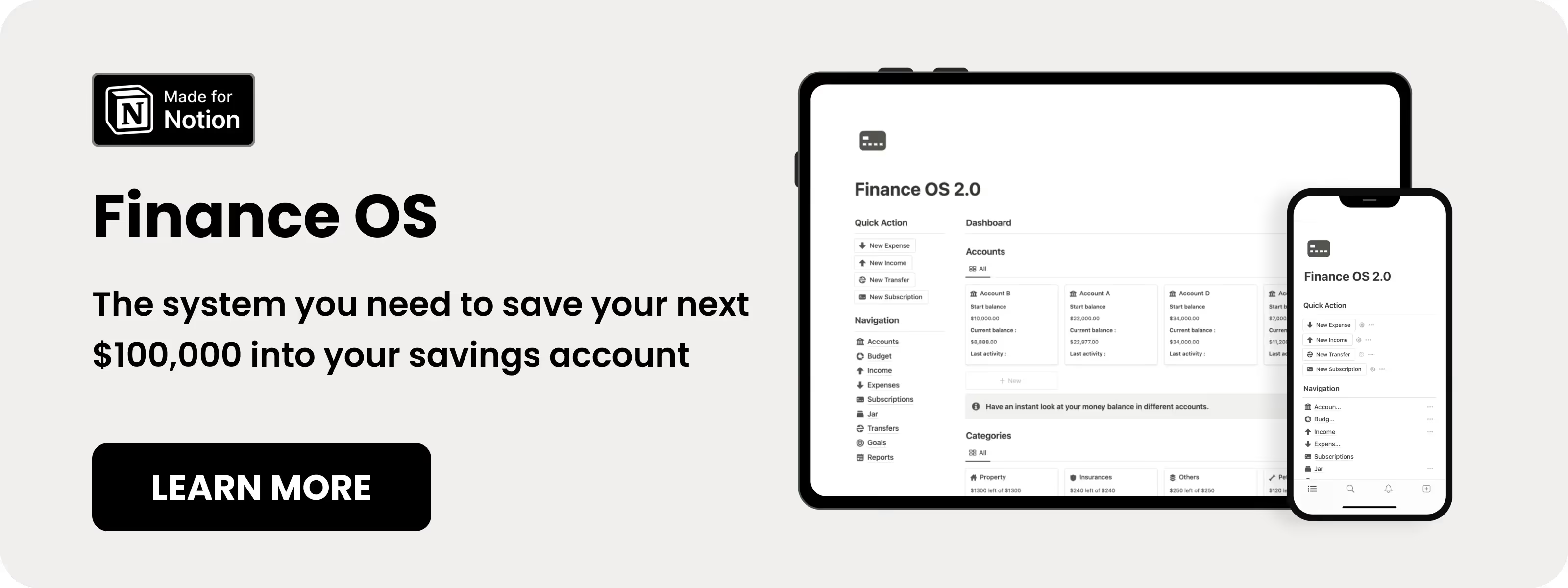
Table of content
- Notion Finance OS Template
- Free Notion Finance Tracker
- Notion Expense Tracker Template
- Simple Notion Spending Tracker
- Notion Ultimate Expense Tracker Template
- Notion Expenses Tracker Template
- Simple Expense Tracker Template
- Free Notion Expense Tracker
- Notion Expense Tracker
- Expense Tracker template in Notion
- Notion Expense Tracker Template
- How to Build a Simple Expense Tracker in Notion
11 Best Notion Expense Tracker Templates in 2026
1. Notion Finance OS Template (⭐️ Recommended)
This Notion expense tracker is built for people who want everything in one place, not just basic logging. I’d reach for this when I want a full system that connects spending, budgets, and goals without jumping between pages.
Key features:
- All-in-one dashboard: See accounts, income, and expenses together
- Budget tracking: Monitor category limits in real time
- Savings goals: Track progress toward financial targets
- Subscription tracking: Keep recurring expenses visible
.avif)
2. Free Notion Finance Tracker template
If you want a simple Notion expense tracker without overthinking the setup, this one does the job. I’d use this when I just need clean tracking and don’t want extra features getting in the way.
Key features:
- Quick expense logging: Add entries in seconds
- Pre-built categories: Start tracking immediately
- Minimal dashboard: Clear overview without clutter
.avif)
3. Notion Expense Tracker template
Among Notion expense tracker templates, this one stands out for its simplicity and reliability. I’d personally pick this if I want something proven that just works daily without friction.
Key features:
- Clean input system: Log expenses quickly
- Flexible categories: Organize spending your way
- Time-based views: Switch between monthly and yearly insights
.avif)
4. Simple Notion Spending Tracker
This Notion expense tracker focuses on awareness, not just numbers. I’d use this when I want to understand my spending behavior, not just track totals.
Key features:
- Vendor-based tracking: Log where money goes
- Emoji reflection system: Rate how purchases feel
- Calendar view: Visualize spending patterns
- Monthly reset button: Start fresh easily
.avif)
5. Notion Ultimate Expense Tracker template
If you want a Notion expense tracker that shows both short-term and long-term trends, this one fits. This makes sense for me when I care about yearly patterns as much as monthly spending.
Key features:
- Multi-level tracking: Daily, monthly, yearly views
- Expense summaries: Clear breakdowns over time
- Visual charts: Understand spending faster
.avif)
6. Notion Expenses Tracker template
This template is one of the more goal-focused Notion expense tracker setups. I’d reach for this when my spending is tied directly to saving or financial targets.
Key features:
- Flexible logging: Add expenses anytime
- Custom tags: Organize categories freely
- Goal tracking: Monitor financial progress
- Trend insights: Spot spending habits
.avif)
7. Simple Expense Tracker
This Notion expense tracker is built for clarity and ease of use. I’d use this when I want something beginner-friendly that still gives useful insights.
Key features:
- Straightforward logging: No learning curve
- Custom categories: Adapt to personal needs
- Multiple views: Switch between time filters
- Visual charts: Quick spending insights
.avif)
8. Free Notion Expense Tracker
I like this Notion expense tracker because it removes manual calculations completely. I’d use this when I want the system to handle totals and breakdowns automatically.
Key features:
- Auto calculations: Totals update instantly
- Category breakdown: Clear spending insights
- 30-day view: Quick recent overview
- Free access: No limitations
.avif)
9. Notion Expense Tracker
This Notion expense tracker uses a structured approach with linked databases. I’d pick this if I want more control over categories and budget tracking.
Key features:
- Dual database setup: Categories and expenses linked
- Budget tracking: Monitor category limits
- Visual insights: See spending patterns clearly
- Clean layout: Easy navigation
.avif)
10. Expense Tracker template in Notion
This template works well as a flexible Notion expense tracker for both personal and business use. I’d use this when I need something that handles more structured expense reporting.
Key features:
- Detailed categories: Cover personal and business expenses
- Budget monitoring: Track planned vs actual spending
- Reports: Generate summaries
- Reminders: Stay on top of recurring costs
.avif)
11. Notion Expense Tracker Template
This Notion expense tracker keeps things simple and consistent. I’d reach for this when I struggle with consistency and need something easy to stick with daily.
Key features:
- Daily logging: Track expenses quickly
- Monthly totals: See spending clearly
- Category breakdown: Understand patterns
- Clean interface: No distractions
.avif)
How to Build a Simple Expense Tracker in Notion
Want to build your own instead of using a template? Here's a step-by-step guide that takes about 15 minutes.
Step 1: Create Your Expenses Database
Open Notion and create a new page. Give it a name like "Expense Tracker" or "My Finances."
Type /database and select "Table - Full page" or "Table - Inline" depending on your preference. Inline works well if you want the tracker as part of a larger finance page.
Rename the default "Name" column to "Description" or "Expense." This is where you'll briefly note what each purchase was.
Step 2: Add Essential Properties
Click the "+" button to add new columns. Create these properties:
- Amount (Number): Set the format to your currency
- Date (Date): When the expense occurred
- Category (Select): Add options like Groceries, Transportation, Entertainment, Utilities, Dining Out, Shopping, Health
- Payment Method (Select): Options like Cash, Debit Card, Credit Card, or specific account names
You can add more properties later. These four cover 90% of what you need for meaningful tracking.
Step 3: Set Up Categories
Click into the Category column and add your spending categories. Start broad. Here's a sensible starting list:
- Housing (rent, mortgage, repairs)
- Utilities (electric, water, internet, phone)
- Groceries
- Transportation (gas, transit, parking, rideshare)
- Dining Out
- Entertainment (streaming, events, hobbies)
- Health (medical, pharmacy, fitness)
- Shopping (clothing, household items)
- Subscriptions
- Miscellaneous
Assign a different color to each category. This makes visual scanning much faster.
Step 4: Create Useful Views
Your database can display the same data in multiple ways. Click "+ Add a view" next to your table name.
Create a "This Month" view:
- Choose Table view
- Add a filter: Date is within "This month"
- Add a sum calculation to the Amount column
Create a "By Category" view:
- Choose Table view
- Group by: Category
- This shows spending totals per category
Create a "Calendar" view:
- Choose Calendar view
- This displays expenses on the dates they occurred
Step 5: Add a Simple Dashboard
Go back to your main tracker page. Above or beside your database, add some context.
Type /callout and create a section for quick stats. You can manually update this weekly, or use Notion formulas to calculate automatically.
Consider adding:
- Monthly budget target
- Current month's total spending
- Top spending category this month
- Remaining budget
For automatic calculations, explore Notion's formula property or use third-party tools like Notion Charts to visualize your data.
Liked this? I've got more Notion templates that might help. They're all ready to use, no setup required.
Frequently Asked Questions
Is Notion free for expense tracking?
Yes. Notion's free plan includes everything you need for personal expense tracking: unlimited pages, databases, and basic integrations. You only need a paid plan if you want features like unlimited file uploads, version history beyond 7 days, or team collaboration tools. Most individual expense trackers work perfectly on the free tier.
Can I sync my bank accounts with Notion?
Not directly. Notion doesn't have built-in bank integrations like dedicated budgeting apps do. However, you can use third-party automation tools like Zapier or Make to connect banking apps with Notion. Some users export bank statements as CSV files and import them into Notion databases. For most people, manual entry takes only a few seconds per expense and keeps you more aware of spending.
How do I track recurring expenses in Notion?
Create a separate "Recurring Expenses" database or add a "Recurring" checkbox property to your main expense database. For subscriptions and fixed monthly costs, you can use Notion's recurring template feature to automatically create entries. Some users prefer keeping a master list of recurring expenses and duplicating them monthly rather than logging them with daily purchases.
Is Notion better than budgeting apps like Mint?
It depends on what you value. Budgeting apps typically offer automatic bank syncing, spending alerts, and credit score monitoring. Notion offers complete customization, no monthly fees, and integration with your other life systems. If you want hands-off tracking, a dedicated app might work better. If you prefer control over your system and don't mind manual entry, Notion often wins. Note that Mint was discontinued in 2024, pushing many users toward alternatives like Notion anyway.
Can multiple people use the same Notion expense tracker?
Yes. You can share a Notion page with family members or partners. Everyone can log expenses to the same database, and changes sync in real-time. For households managing shared finances, this works well. You can add a "Who" property to track which person made each purchase. Notion's free plan allows sharing with up to 10 guests for collaborative pages.