.avif)
14 Notion Templates for Content Creators to grow in 2026

One of the most frequent requests I get is for Notion templates for content creators, and a lot of people ask if I actually use one myself.
The answer is yes. I’ve used one for almost three years now. It’s the exact system that helped me hit 10k followers on Instagram, 6k followers on Twitter, and helps me run my weekly newsletter for 25k readers. That’s over 40k followers and readers in total.
As a certified Notion creator with three official badges and certificates (you can check my LinkedIn here), I can tell immediately which Notion templates for content creators will actually work and which ones are just fluff.
I hand-picked and reviewed these 14 templates based on what actually works. Let's get started.
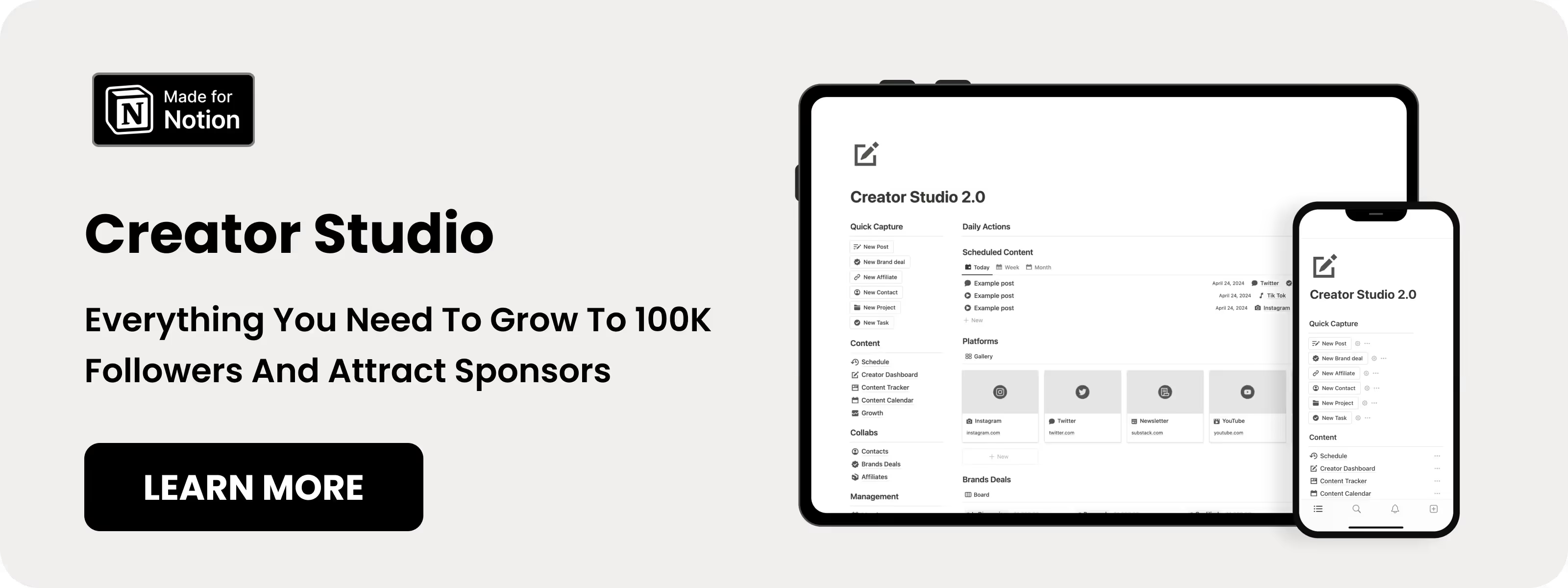
Table of content
14 Notion Templates for Content Creators
1. Notion Creator Studio (⭐️ Recommended)
I built this system myself because I needed a better way to run my social media. I have used it every single day for three years straight to manage all my social media accounts. This is the exact template I mentioned before that helped me grow my 40k+ audience.
I am not just saying that to make you buy it -lol- but this template is a real content machine. It is not just a basic content calendar. It helps you manage everything from your first ideas to the money you make. This is the best one if you want to publish consistent Content without guessing what to post next.
Key features:
- Dashboard: Manage content, sponsors, and projects.
- Posting Schedule: Visual weekly plan.
- Content Tracker: Track each piece from idea to published.
- Brand Deals Manager: Track sponsorships and deliverables.
.avif)
2. Notion Content Creator
When I found this template on Gumroad, I said this one definitely needs to be on my list. It's a clean, simple layout built for tracking your posts without any extra fluff.
Key features:
- Content Drafts: Templates for Instagram, YouTube, TikTok, and more.
- Task Manager: Track daily tasks alongside content.
- Sponsor Manager: Track brand deals and deadlines.
- Asset Library: Store graphics, videos, and documents.

3. Notion Content Creation Hub
I couldn't skip this one. It has a 4.9-star rating and has been sold over 460 times, which tells me that content creators actually like this template and use it. It helps you turn your content into multiple formats, and reuse it across different platforms.
Key features:
- Multi-Platform Manager: Manage all social channels in one place.
- Curation Board: Save inspiring content from the web.
- SEO Tools: Built-in resources for discoverability.
- Content Repurposing: Transform one post into multiple formats.
.avif)
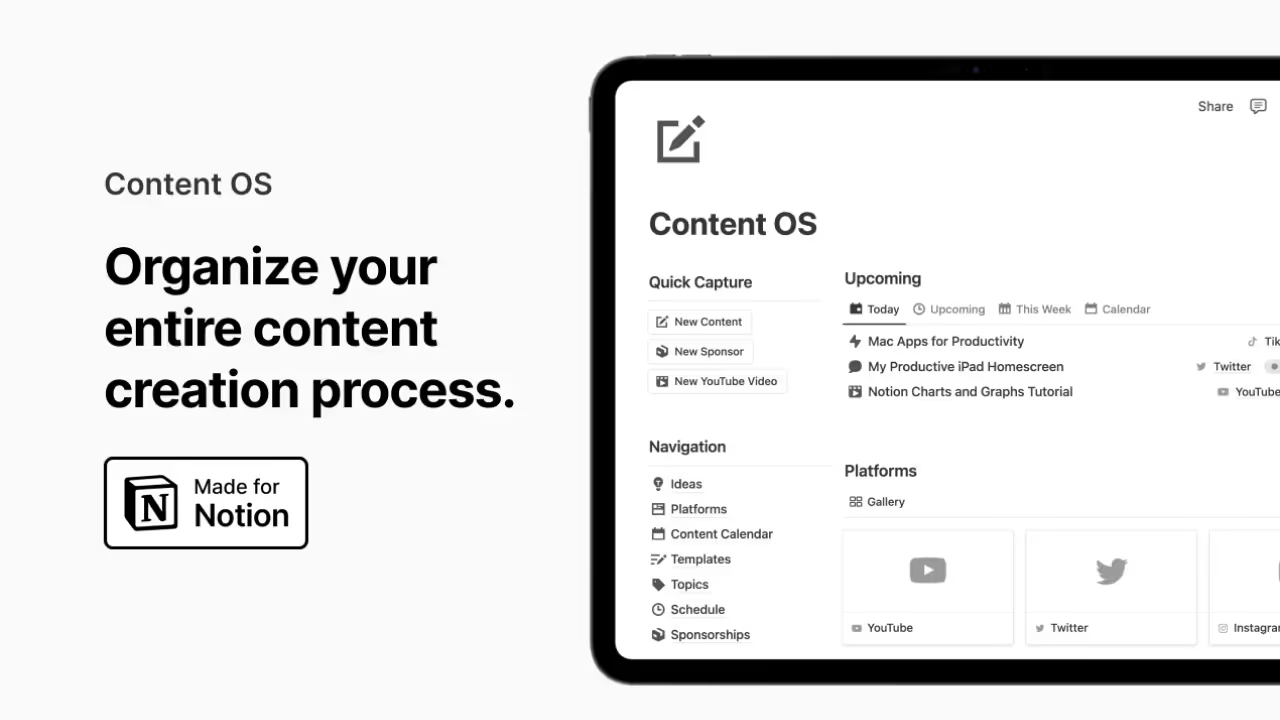
4. Notion Content OS
When I saw this one, I was like: this has to be in my list. It is built by Easlo, who is a well-known Notion creator out there. As a Notion expert myself, I can confirm this is one of the best content templates you can find.
Key features:
- Content Platforms Dashboard: Track all social media in one place.
- Content Calendar: Plan and track posts from start to finish.
- Content Topics System: Organize content around themes.
- Sponsorship & Affiliate Tracking: Manage deals and earnings.
5. Notion Content System
This is honestly one of the best content creation templates I've seen. It has over 49 5-star ratings, and when a template gets that many 5-star reviews, it means creators are actually using it to get work done, so it definitely deserves a place on this list.
Key features:
- Roadmap Builder: Plan weekly content and platforms.
- Topic Organization: Structure content around themes.
- Template System: Reuse templates for faster creation.
- Bookmark Collection: Save inspiring content for reference.
.avif)
6. Notion Simple Content Creation
At first look, this template looks like it's just a simple one like its name, but believe me, actually it's more powerful than that. What I like the most about this is how the creator of this template organized everything inside it.
Key features:
- Centralized Content Database: All content in one place.
- Home Dashboard: Quick overview of tasks and calendar.
- Creation Pipeline: Track content stages from idea to promotion.
- Automated Pipeline: Move content automatically through stages.
.avif)
7. Notion Content Creator Brain
This is probably the most complete content creators template I've seen. It's like a second brain for creators. You can use it to organize your entire life and content in one place, so this one is approved to be on this list. And If you like colors too, this one is for you
Key features:
- Life & Creator Dashboards: Separate personal and business views.
- Social Media Manager: Control all platform accounts.
- Content Planner: Schedule posts clearly.
- Affiliates & Sponsorship Manager: Track revenue partnerships.
.avif)
8. Notion Content Planner 3.0
This one got downloaded over 5,000 times with fifty-one 5-star ratings, which is a massive amount of social proof. It also has a pro version for $69 that unlocks all the premium features, but the base version alone is great, so it definitely earned its spot on this list.
Key features:
- Content Hub: Store ideas, drafts, and assets.
- Campaign Planner: Track marketing campaigns.
- Brands & Collaboration Tracker: Manage partnerships.
- Hashtag Bank: Organize hashtags for reach.
- Analytics Dashboard: Track performance visually.
.avif)
9. Notion Social Media Manager
I guess this is one of the simplest and most affordable social media planners I have seen out there. It's only $9, and with over 700 downloads, this is actually a good one to start with if you don't want to break the bank.
Key features:
- Post Manager: Organize posts with full visibility.
- Content Calendar: Plan posting schedule visually.
- KPI/Goal Tracking: Set and monitor performance metrics.
- Platform Labeling: Tag posts by platform.
- Exportable Queue: Export content calendar easily.
.avif)
10. Notion Social Media OS
Wait a second, what about minimalism templates, is there some? Actually yes, and this is one of them. If you are a minimalist, this is the best option for you. It keeps everything clean, focused, and free of unnecessary distractions.
Key features:
- Content Calendar: Visual posting schedule.
- Goal Tracker: Track social media objectives.
- Topics Organization: Group content by themes.
- Kanban Board: Drag-and-drop workflow.
- Platforms Manager: Track all account data in one place.
.avif)
11. Notion Content System Plus
A lot of content templates get too bloated with useless features, but this one is clean and straightforward, which makes it a great addition to the list.
Key features:
- Content Management: Schedule and publish content.
- Brand Companion: Define brand identity.
- Creators Database: Track competitors and collaborators.
- Content Board & Calendar: Visualize content workflow.
- Live Count & Growth Tracker: Monitor metrics over time.
.avif)
12. Notion Social Media Planner (Free)
This is another template I built myself, and what I like about it is that it's completely free to use. It has over 13,000 downloads and 260 5-star ratings, can you imagine that? I am honestly proud that my template is really helping creators out there get organized without having to pay a dime.
Key features:
- Viral Idea Capture: Save post ideas quickly.
- Advance Planning: Plan weeks of content ahead.
- Status Tracking: Track each post from idea to live.
- Scheduling View: See upcoming content easily.
View Notion Social Media Planner
.avif)
13. Notion Content Calendar (Free)
This is the second free template on this list. It's from Easlo and it's one of the best free templates I have seen. It's a pleasure to see good templates like this for free to help new content creators get started without any cost.
Key features:
- Unlimited Channels: Manage all social media in one place.
- Content Tracking: Track content from idea to published.
- Multi-Platform Support: Work without switching apps.
.avif)
14. Notion Content Creator Planners (Free)
When I see a template, I can immediately know if it’s gold or trash. And this one? It is absolutely gold. I still don't know how this guy Oussama (the creator's name) offers this for free lol, because the quality here easily matches premium templates.
Key features:
- Platform Manager: Organize social accounts in one view.
- Content Calendar: Plan posts easily.
- Sponsorships Manager: Track brand deals.
- Content Ideas Storage: Build a library of post ideas.
.avif)
Common Questions About Notion templates for content creators
How much time can I save using Notion templates?
Honestly it depends on how chaotic your current system is. For me, having everything in one place instead of jumping between apps saves me hours every week. No more searching for that one idea I saved somewhere or forgetting to follow up on a brand deal.
How do I choose between different templates?
Start with what your biggest problem is. If you struggle with planning and consistency, go for a content calendar focused template. If you manage brand deals and sponsors, you need something with a CRM built in. Don't pick the most complex one, pick the one that solves your actual problem.
Can I customize these templates?
Yes, everything in Notion is customizable. You can add fields, remove what you don't need, change views, and build on top of any template. I do this with my own templates all the time based on feedback from users.
Are free templates good enough for professional creators?
Some of them yes. I built a free social media planner that has over 13,000 downloads and 260 five star reviews. Free doesn't always mean low quality. But if you're running a serious content business with sponsors and multiple platforms, a more complete paid template will save you more time in the long run.